Introduction
Businesses often spend more time managing routine tasks than completing the work that actually drives growth. Purchase approvals, customer orders, employee requests, and internal communication can become complicated when every department follows a different process. Delayed approvals and unclear responsibilities frequently lead to unnecessary follow-ups and missed deadlines. A structured workflow helps businesses organise activities, improve coordination, and maintain accountability. Modern workflow management tools make it easier to design processes, assign responsibilities, and ensure that important tasks move forward without unnecessary delays.
Understanding Workflow Management
A workflow is a sequence of tasks that takes an activity from initiation to completion. It establishes who performs each task, what information is required, and which approvals must be completed before the next stage begins.
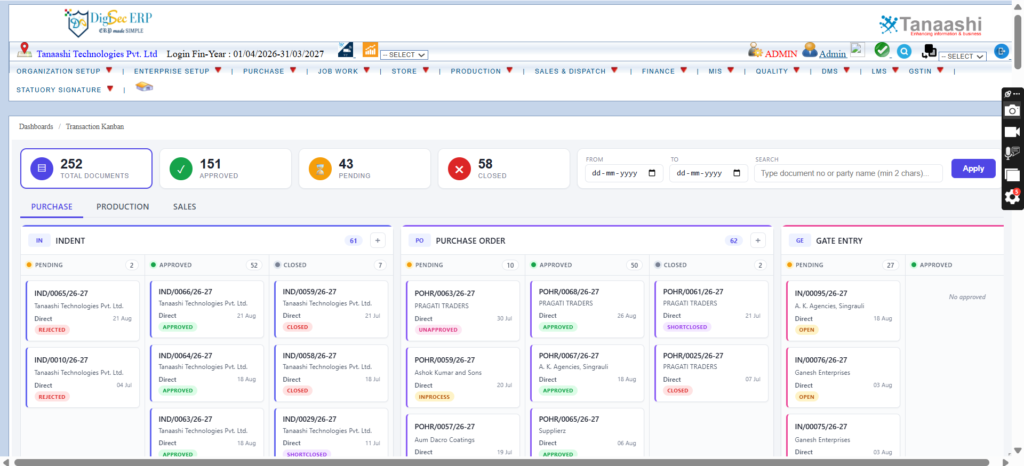
For example, a purchase request may begin with an employee submitting a requirement. The manager reviews the request, the accounts department checks the budget, and the purchasing team processes the order after approval.
Without a clearly defined process, requests may remain pending, employees may become confused about their responsibilities, and managers may struggle to identify bottlenecks.
An organised workflow helps businesses:
- Establish clear responsibilities for employees.
- Reduce unnecessary communication and follow-ups.
- Improve visibility into pending activities.
- Maintain consistent procedures across departments.
- Minimise delays in routine business operations.
- Improve accountability through process tracking.
These improvements help employees complete tasks more efficiently while giving managers better control over daily activities.
How Drag and Drop Workflow Simplifies Process Creation
A drag and drop workflow feature allows users to arrange process steps visually by moving workflow elements into the required sequence, where supported by the software. This approach can make workflow configuration easier for authorised users without requiring extensive technical knowledge.

Instead of relying on complicated instructions, businesses can create a visual representation of how tasks should move between employees or departments.
For example, a sales order approval process may include:
- Order submission by the sales representative.
- Verification of customer information.
- Review of pricing and payment conditions.
- Approval by the authorised manager.
- Order processing and status notification.
A visual process builder can help users understand the sequence of activities and modify steps when business requirements change. However, appropriate permissions, approval rules, and exception handling remain essential for maintaining control.
Practical Applications Across Business Departments
Workflow management can support several business functions, depending on the organisation's requirements.
Purchase management: Businesses can establish approval procedures for purchase requests, supplier selection, and order processing.
Sales operations: Customer orders can follow defined verification and approval stages before processing.
Human resources: Employee onboarding, leave requests, and internal documentation can be managed through structured procedures.
Accounting: Expense claims, payment requests, and financial approvals can be assigned to authorised employees.
Inventory management: Material issue requests, stock adjustments, and transfer approvals can follow consistent processes.
These applications reduce confusion and help employees understand what needs to happen next.
Essential Features to Evaluate Before Implementation
Selecting workflow software requires understanding how well it supports actual business requirements. A visually attractive interface alone does not guarantee effective process management.
Businesses should evaluate the following features:
- Approval controls:Configure approval levels according to company policies.
- User permissions:Restrict access to authorised employees.
- Notifications:Inform employees about pending tasks and important updates.
- Process tracking:Monitor completed, pending, and rejected activities.
- Reporting:Identify recurring delays and review process performance.
- Flexibility:Modify workflows as operational requirements evolve.
Employee training is equally important. When employees understand the process and their responsibilities, workflow automation becomes more effective.
Making Workflow Automation More Effective
Before automating business activities, organisations should review their existing procedures. Unnecessary approval stages, duplicated responsibilities, and unclear instructions should be corrected before introducing software.
A practical implementation approach includes identifying repetitive tasks, defining responsibilities, establishing approval rules, testing the process, and collecting employee feedback.
Regular reviews help businesses identify improvements and ensure that workflows remain useful as operations expand.
Conclusion
Structured workflows help businesses improve coordination, reduce repetitive communication, and manage routine activities more efficiently. Visual process management can simplify workflow creation while supporting consistent procedures across departments. Before implementation, organisations should assess approval requirements, employee responsibilities, reporting capabilities, and system flexibility. Tanaashi Technologies Pvt. Ltd provides business software solutions that support organised operations and improved business management. Exploring suitable digital tools can help companies establish clearer processes and build a more efficient working environment.
FAQs
- What business solutions are available on tanaashi.com?
The website provides information about software solutions for manufacturing and business management.
- How does visual workflow automation improve efficiency?
It helps employees follow organised processes, complete tasks efficiently, and reduce manual coordination.
- Can workflow software manage purchase approvals?
Yes, suitable systems can automate purchase request routing and approval procedures.
- Is workflow automation useful for small businesses?
Yes, it helps small businesses organise repetitive tasks and improve employee coordination.