Introduction
Businesses often lose valuable time managing repetitive tasks, approvals, and communication between departments. When employees depend on emails, spreadsheets, or manual instructions to complete everyday activities, even simple processes can become unnecessarily complicated. Delayed approvals, unclear responsibilities, and missed updates can affect productivity and customer satisfaction. A well-organised workflow helps businesses establish clear procedures, reduce confusion, and maintain better control over daily operations. Modern workflow management tools make it easier to organise tasks, assign responsibilities, and improve coordination without creating additional administrative burdens.
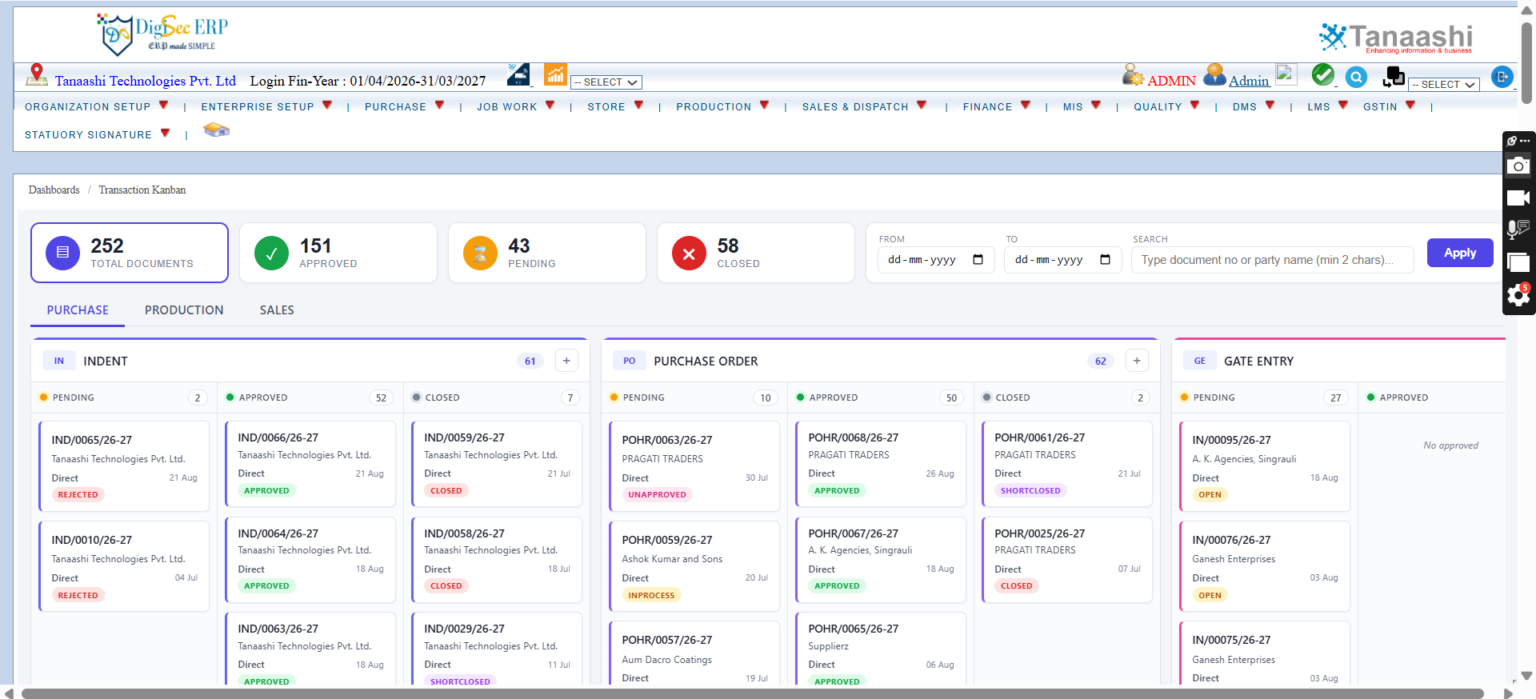
Understanding Workflow Management in Business
A workflow is a sequence of activities that takes a task from its starting point to completion. It defines what needs to happen, who is responsible, and which steps must be completed before the process moves forward.
For example, a purchase request may require employee submission, manager approval, budget verification, and final processing by the purchasing department. Without a defined process, requests may remain pending or move between departments without clear accountability.
An organised workflow helps businesses:
- Reduce unnecessary delays in routine activities.
- Establish clear responsibilities for employees.
- Improve communication between departments.
- Maintain visibility into pending tasks.
- Create more consistent working procedures.
- Reduce dependency on manual follow-ups.
When employees understand their responsibilities and managers can monitor progress, everyday business activities become easier to manage.
How Drag and Drop Workflow Improves Process Management
A drag and drop workflow allows users to arrange process steps visually by moving workflow elements into the required sequence, where supported by the software. Instead of configuring every process through complicated technical instructions, authorised users can create or modify workflows through an easier visual interface.

This approach can be useful for businesses that frequently adjust their approval processes or need different workflows for different departments.
For example, a company may create a sales order approval process with the following steps:
- Sales representative submits the order.
- Manager reviews pricing and customer requirements.
- Accounts department verifies payment conditions.
- The order moves to processing after approval.
- Relevant employees receive status updates.
Visual workflow configuration can make these processes easier to understand and maintain. However, businesses should also ensure that approval permissions, notifications, and exception handling are configured correctly.
Practical Applications Across Different Departments
Workflow management is not limited to one department. Businesses can apply structured processes across several functions depending on their operational requirements.
Purchase management: Purchase requests can follow defined approval stages before orders are released to suppliers.
Sales operations: Customer orders can move through verification, approval, and processing stages.
Human resources: Employee leave requests, onboarding activities, and document approvals can follow standard procedures.
Accounting: Expense claims and payment approvals can be assigned to the appropriate employees.
Inventory management: Stock adjustment requests and material issue approvals can be handled through controlled processes.
These applications help organisations maintain consistency while reducing unnecessary communication between employees.

Important Features to Consider Before Choosing Workflow Software
Selecting suitable workflow software requires more than checking whether a visual process builder is available. Businesses should evaluate how effectively the system supports their actual working requirements.
Important features include:
- User permissions:Ensure employees can access only the processes and information relevant to their responsibilities.
- Approval management:Configure approval levels according to business policies.
- Notifications:Keep employees informed about pending tasks and process updates.
- Process tracking:Monitor completed, pending, and rejected activities.
- Reporting:Review workflow performance and identify recurring delays.
- Flexibility:Modify processes when business requirements change.
Employee training is equally important. Even a capable system may deliver limited benefits if employees do not understand how to use it correctly.
Building More Efficient Business Operations
Businesses can improve productivity by reviewing existing processes before introducing automation. Unnecessary approval stages, duplicated responsibilities, and unclear instructions should be addressed first.
A practical implementation approach includes identifying repetitive activities, defining responsibilities, setting approval rules, testing the process, and collecting employee feedback. Regular reviews help businesses identify opportunities for improvement and ensure that workflows continue to meet operational needs.
Conclusion
Well-designed workflows help businesses organise responsibilities, improve communication, and reduce delays in routine operations. Visual process management can make workflow creation easier while supporting consistent procedures across departments. Before implementing automation, organisations should evaluate their approval requirements, employee responsibilities, reporting needs, and system flexibility. Tanaashi Technologies Pvt. Ltd offers business software solutions that support operational efficiency and organised business management. Visit https://tanaashi.com/ to explore available solutions and understand how structured digital processes can support your business growth.
FAQs
- What business solutions can I explore on tanaashi.com?
You can explore software solutions for manufacturing and business process management. - How does visual workflow automation improve productivity?
It helps employees follow organised processes, complete tasks efficiently, and reduce manual coordination. - Can workflow software manage approval processes?
Yes, suitable systems can support approvals for purchases, sales orders, expenses, and other business activities. - Is workflow automation suitable for small businesses?
Yes, small businesses can automate repetitive tasks and improve coordination without unnecessarily complicating operations.